


App Cloner Premium & Add-ons
1.9881.00 Reviews
App Specs
- Version
- 3.4.0
- Updated On
- License
- Free
- Downloads
- 5,000,000+
- Developer
- App Listo
- Categories
- Libraries & Demo
- Platform
- Android
Screenshots
 Analysis by AppCompare
I’d approach App Cloner Premium & Add-ons as a tool for a specific problem, not as a general phone utility: it can make separate copies of apps you already have, which may help when you need distinct accounts or want to keep two app setups apart. I find the idea appealing when switching accounts becomes a daily nuisance, but cloning is not guaranteed to work with every app, so it is best to begin with one that matters less and see how it behaves on your device.
Getting Started with App Cloner
Jumping into App Cloner Premium & Add-ons was a breeze. The interface is clean, intuitive, and made me feel like I was in control from the get-go. You just pick an app you want to clone, tweak a few settings, and boom—you’ve got a clone ready to roll. No complicated steps or tech wizardry required. It’s like magic, but real.
What to expect from a cloning tool
The practical promise is straightforward: instead of signing out of one account and into another in the same app, you can try keeping a separate copy for the second account. That distinction matters. A cloned app is not a new account by itself; you still need to sign in with the account you intend to use, and the service’s own rules and sign-in checks still apply.
This is an Android app in the Libraries & Demo category, developed by App Listo. It is free to install, is rated for Everyone, and has reached over five million installs. The current version is 3.3.0, with Android 5.0 as its minimum operating system requirement. Those basics make it accessible to many Android users, but they do not mean every app will clone or behave identically.
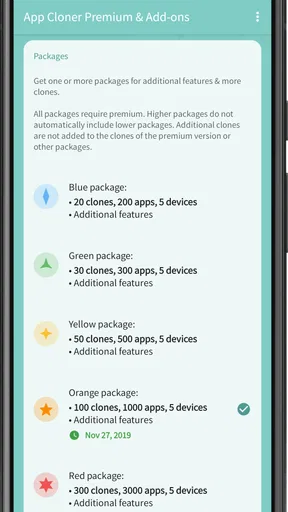
I’d also set expectations around the name: “Premium & Add-ons” points to paid extras, not a guarantee that every advanced option comes free. In-app purchases range from around ten dollars to around three hundred and twenty dollars per item, so I would inspect what an option actually unlocks before buying anything. If all you need is a second login, first test whether the basic workflow solves that problem.
Customization Galore
One of the standout features here is the level of customization. Want to change the icon color of your cloned app? Go for it. Need a different app name to keep things organized? Easy peasy. The app gives you a bunch of options to make each clone feel unique. I found this super handy for keeping track of different accounts across social media platforms.
Those small identity changes are more useful than they first sound. If two copies sit next to each other, a distinct label or icon treatment can help prevent a rushed tap from opening the wrong account. I’d choose names that explain the purpose at a glance—such as “Work” and “Personal”—rather than relying on a subtle color difference that may be hard to notice on a busy home screen.
Worth Reading Before You Choose

Switching to Android Auto Means Rethinking Your Driving Routine

Google Calendar Makes a Crowded Week Easier to Manage

Baby Panda World Brings Quick Play to Modern Phones, but Its Game Library Feels Busy

ESPN’s Live Game View Makes Following Close Games Easier

QuizzLand Review: A Good Fit for Short Trivia Breaks, Not Every Player

Basketball Stars: Multiplayer Is Fast, but Can It Recover When Matches Go Wrong?
A sensible first setup is to clone just one app, give the copy a clear name, and then sign in to the second account. Keep the original unchanged while you test the copy. This makes it easier to tell whether a login issue belongs to the cloned version or to the service itself, and it avoids turning a simple trial into a full reorganization of your phone.
Your first useful result
A realistic use case is someone who manages a personal social profile and a separate profile for a small business. On a busy morning, opening a clearly labeled work copy can be quicker than signing out of a personal account, entering different credentials, and later reversing the process. The benefit is less account-switching friction; it does not remove the need to manage notifications, passwords, or the boundaries between those accounts.
After installing and opening the tool, I’d pick the app I most often switch accounts in, make a single copy, and identify it clearly. Then I’d launch that copy, sign in, and check the core actions I rely on—sending a message, viewing the feed, or receiving a notification. A clone that opens successfully but fails at the one task you need has not solved the problem, so this quick, focused test is more useful than creating several copies at once.
For a gamer with separate profiles, the same idea may be convenient if the particular game works in a clone. I would not assume that it will: games can have their own compatibility checks, account protections, or sign-in behavior. If a game blocks the copy or behaves inconsistently, using its built-in account switcher, when available, is usually the simpler and more dependable route.
Performance and Usability
Now, let’s talk about performance. I was pleasantly surprised to find that the cloned apps run just as smoothly as the originals. No lag or crashes, which is a huge plus in my book. The app supports a wide variety of apps, so whether you’re looking to clone WhatsApp, Instagram, or something else entirely, you’re covered.
I would treat that smooth experience as a possibility rather than a promise for every phone and app combination. A clone is another installed copy to manage, and its behavior can depend on the app being copied and the device environment. If the original receives an update, it is worth checking the copy afterward instead of assuming that the same features and sign-in state will carry over without a hitch.
One useful habit is to test the clone after changes that matter: an app update, a password reset, or a switch in account security settings. Check that you can still open the copy and complete the action you need before relying on it for a time-sensitive task. If you use the copy for work, keep the original as a fallback until you know the cloned setup is stable for your routine.
There is also a practical storage and attention trade-off. Two copies mean two app icons and potentially two streams of notifications to sort out. I’d disable or adjust alerts in the copy if they become distracting, while taking care not to silence messages I genuinely need. The point is to separate accounts, not to create a second source of noise that makes the phone harder to manage.
Common confusion: clones, accounts, and add-ons
The most common misunderstanding is expecting the tool to create a second identity automatically. It creates a copy of an app; the account remains something you supply and manage. If a service permits only one active session, uses extra verification, or restricts a particular setup, cloning cannot override those rules. For a service with a reliable built-in profile switcher, I’d compare that option first because it keeps account management inside the official app.
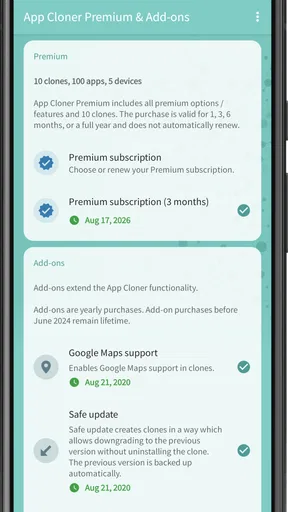
Another point worth separating is an add-on from the basic act of making a copy. Some extras may change what you can customize or control, but I would read each purchase description carefully and decide whether that particular option addresses a real need. The app’s rating averages 1.9 from around twenty-seven thousand ratings, with around eight hundred eighty reviews, so I’d be cautious about spending before testing the central workflow and deciding how much value the extras would add for me.
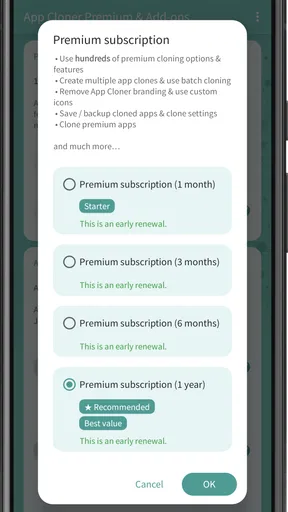
The app is listed as free, but that does not mean every feature is free; paid in-app items are available. I would start without purchasing an add-on, confirm that the app I care about can be copied and used as intended, and only then consider paying for a specific extra. That order reduces the chance of buying something before discovering that the target app itself is a poor fit for cloning.
Privacy deserves the same careful distinction. The original review experience described an option to block analytics and tracking, which may appeal to people who want more control over a cloned app’s behavior. I would not treat that as a blanket privacy guarantee for the clone, the original app, or the service account. Review the settings you enable and the privacy choices offered by the app you are copying, especially if you use it for sensitive conversations or work data.
Add-ons and Extras
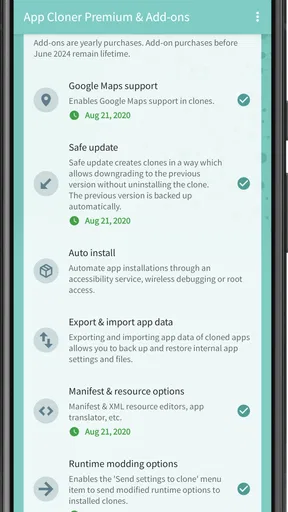
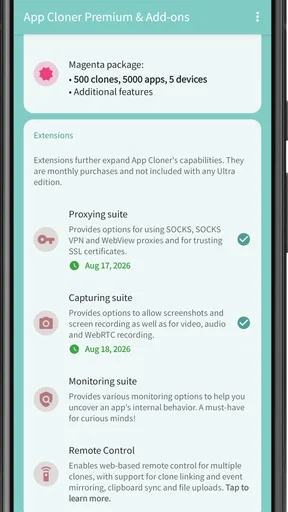
What’s cool about the premium version is the access to additional add-ons. These offer even more features and customization options. For instance, I loved the ability to block analytics and tracking. It’s like having a little more privacy in your pocket. Plus, the premium version is ad-free, which just makes the whole experience smoother.
For me, the best reason to look at an add-on is a concrete task that the basic setup does not handle, rather than collecting options because they are available. Make the clone first, use it for the job you had in mind, and note exactly what is missing. Then check whether an add-on addresses that gap. This keeps the decision grounded in your own workflow instead of the assumption that more settings automatically mean a better result.
Security and Privacy
We can’t talk about an app like this without addressing security. App Cloner Premium & Add-ons doesn’t require root access, which is a relief because it means you’re not compromising your device’s security. It’s designed to work seamlessly without needing to tinker with your device’s core settings.
Not needing root is a practical advantage for someone who wants to try app separation without modifying the operating system. Still, I would use ordinary account-safety habits: secure each account with its own appropriate credentials, be thoughtful about which account receives notifications on a shared screen, and avoid treating a renamed icon as a security boundary. A label can prevent mix-ups, but it does not protect private information from someone who can already unlock the phone.
If your goal is simply to keep work and personal communication apart, a separate work profile or a service’s official multi-account feature may be a better fit when your device or app offers one. Those approaches can make the boundary clearer and may be easier to maintain. Cloning makes more sense when the particular app’s normal account switching is tedious and the copy passes your own compatibility test.
Who Is This App For?
If you’re someone who juggles multiple accounts for work and personal use, or if you simply love to tinker and customize your apps, this is definitely worth a look. It’s also a great tool for gamers who want to run separate accounts for different games without the hassle of logging in and out.
I’d especially consider it if I repeatedly switch between two accounts in an app that behaves well when copied, and if I value having separate icons as a quick visual cue. Someone who enjoys adjusting labels and appearance may also appreciate the added control. By contrast, I’d skip it if I only switch accounts occasionally, if the app already has a smooth built-in account selector, or if reliability is more important than avoiding a few extra taps.
Compared with the usual alternatives, this sits between manual sign-outs and system-level separation. Signing out and back in costs time but avoids maintaining another copy. A built-in account switcher is usually less cluttered when it works well. A work profile can offer a broader separation for compatible devices and apps, while this tool focuses on making individual app copies. Which route is best depends on whether your main frustration is repeated logins, keeping work distinct, or simply having a second icon for a second account.
It is also not the right choice for someone who expects every app to duplicate perfectly or wants a universal fix for account restrictions. If a service blocks a clone, the safer move is to use its supported account options rather than repeatedly trying to bypass the limitation. That is particularly important when the account contains work material, purchases, or conversations you cannot afford to lose access to.
Final Thoughts
Overall, App Cloner Premium & Add-ons offers a powerful, user-friendly solution for managing multiple app accounts. It’s packed with features that make it more than just a cloning tool—it’s a customization powerhouse. While there are free alternatives out there, the premium version’s enhancements and lack of ads make it a worthwhile investment for those serious about app management.
My recommendation is to treat it as a focused utility: choose one app that causes frequent account-switching friction, make one clearly labeled copy, and verify that the sign-in and everyday functions you need work. Only after that would I consider adding more copies or paying for extras. That small trial gives you a useful answer without cluttering your phone or spending money on features you may not need.
So, if you’re ready to take control of your app experience, give App Cloner a spin. You might just find it’s the missing piece in your mobile toolkit.
Pros
- Allows multiple app instances
- Customizable app icons
- Enhanced privacy settings
- Supports app translation
- No ads in cloned apps
Cons
- Limited compatibility on some devices
- May cause app instability
- Requires paid version for full features
- Complex settings for beginners
- Certain apps can't be cloned
FAQs for App Cloner Premium & Add-ons
What is App Cloner Premium & Add-ons?
App Cloner Premium & Add-ons is an application that allows users to create and install multiple copies of their favorite apps on the same device. This is particularly useful for managing multiple accounts, such as social media profiles or gaming accounts, without having to log in and out constantly.
How does App Cloner Premium differ from the free version?
App Cloner Premium offers advanced features not available in the free version, such as cloning premium apps, customizing icons, and changing the app name. Additionally, it includes add-ons for enhanced functionality, like password protection and stealth mode, giving users more control and customization options.
Is App Cloner Premium safe to use?
Yes, App Cloner Premium is generally safe to use. However, it’s important to note that cloning certain apps might violate their terms of service. Users should ensure they comply with all app policies and use the app responsibly to avoid any potential account bans or issues.
What devices support App Cloner Premium & Add-ons?
App Cloner Premium & Add-ons is available for Android devices. It requires Android 4.1 or higher to function properly. However, users should check compatibility with specific apps they wish to clone, as some apps may not support cloning or may not function correctly when cloned.
How can I get support for App Cloner Premium issues?
For support with App Cloner Premium, users can visit the official website or contact the developer directly through the app’s support section. The developer frequently updates the app and provides resources such as FAQs, guides, and a community forum to assist users with common issues and troubleshooting.


